 SpendAssure
Download the editable policy template (Markdown)
Start with the resources the policy covers
List the API organisations, projects and enterprise workspaces included in your review. Record a resource identifier and billing source for each. Keep a separate list of newly discovered or unverified accounts; they should not disappear because they have not yet been assigned.
Define the purpose of the policy in one sentence: for example, “Every known AI spending resource has an owner, an approved budget and a reviewed control record.” This is an operational starting point to adapt with your organisation, not a certification or legal compliance policy.
Use the AI spend inventory CSV alongside the policy. The inventory holds resource facts; the policy defines how people make and review decisions about them.
Assign responsibilities before setting thresholds
One person may hold more than one role in a small team. What matters is that the responsibility is explicit and somebody can take over when that person is unavailable.
| Role | Responsible for | Evidence to retain |
|---|---|---|
| Operational owner | Explaining usage and maintaining the resource record | Resource mapping and review date |
| Budget approver | Approving the amount, scope and period | Approval decision and business reason |
| Technical operator | Applying an authorised change and checking the result | Before/after settings and execution outcome |
| Finance reviewer | Reviewing spend, forecasts and unresolved gaps | Monthly report and action owners |
Require a complete budget request
A request should describe the workload and the business reason for the proposed amount. Include the owner, approver, currency, period and the provider resource it maps to. State whether the amount is a planning budget, an enforceable provider setting or an allocation inside a shared resource.
For a change, retain the previous amount as well as the requested amount. Include the expected effect on service availability and whether the change is temporary. A request to restore production traffic still needs an authorised decision about the additional spend.
- Resource and billing boundary
- Current and requested budget or limit
- Currency and recurring period
- Reason and expected workload
- Approver and technical operator
- Expiry or review date for an exception
- Observed outcome after execution
Separate approval, execution and verification
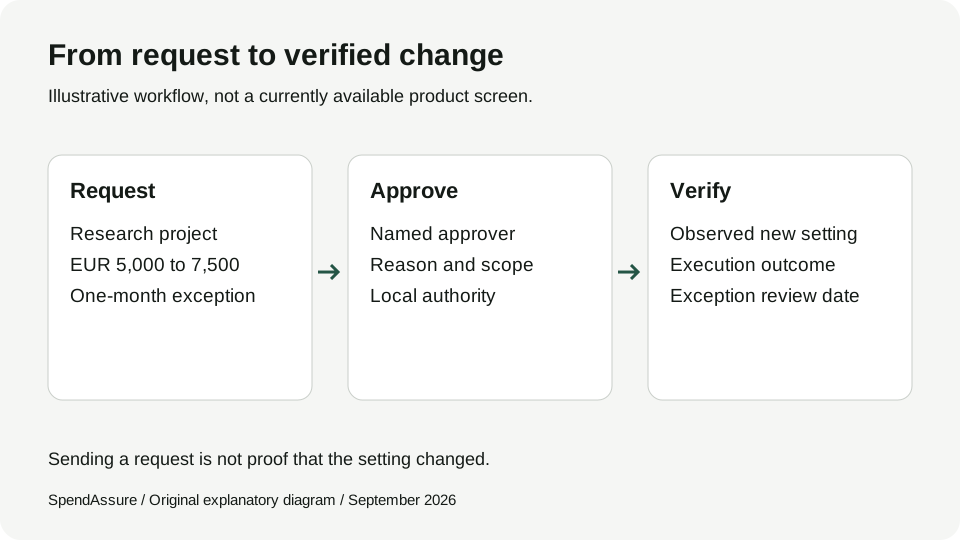
Use a simple sequence: the owner requests, the budget approver decides, the operator applies the permitted change, and the result is verified. An approval should not be marked as implemented merely because a request was sent.
Illustrative example: Research asks to increase a project budget from €5,000 to €7,500 for one month. Finance approves that scope. The operator checks the provider control, applies the permitted change and records the resulting setting. The request includes a date to review the exception and decide the next month’s authority.
This example is a workflow, not a proposed product default. Choose approval responsibilities and thresholds for your own operating needs. Do not copy sample amounts into production policy.
For production resources, agree an operating floor and an escalation contact. Limit reductions can interrupt service. Service-stopping actions need explicit authority; they should not follow automatically from an ambiguous alert.
Review the control behind the budget
For each resource, record which of the four control classes is supported by the available evidence: Contractually bounded, Provider-capped, Velocity-bounded or Unbounded. Keep the class separate from the freshness and source of that evidence.
Automatically verified configuration and manually attested settings belong on separate report lines. Manual records need an author and a review deadline. SpendAssure’s default is 30 days, with conflicting evidence triggering an earlier review.
An approved monthly budget is not a guaranteed invoice maximum. Your policy should make overlapping controls, shared resources and uncovered billable dimensions visible to the person reviewing the report.
Make the monthly review a decision meeting
The policy is useful even if the workflow currently lives in a spreadsheet and your providers’ native consoles. Record where coordination keeps breaking down before adding another system.
SpendAssure supports this monthly review with one register of AI spending, findings with owners and deadlines, and a forecast against the approved budget. See how SpendAssure works.
- Assign owners to new resources and hand over departed owners’ responsibilities.
- Review approved increases and expiring exceptions.
- Compare approved controls with available configuration evidence.
- Investigate unallocated spending, unexpected changes and stale attestations.
- Record a responsible person and next step for every unresolved gap.