 SpendAssure
Does an OpenAI project budget stop spending?
OpenAI’s current documentation distinguishes notifications from enforced monthly limits. An alert leaves requests running. An enforced limit can cause affected requests to fail, but enforcement is delayed and recorded spend can exceed the setting. This distinction matters when reading older advice about project budgets. Source: OpenAI spend limits.
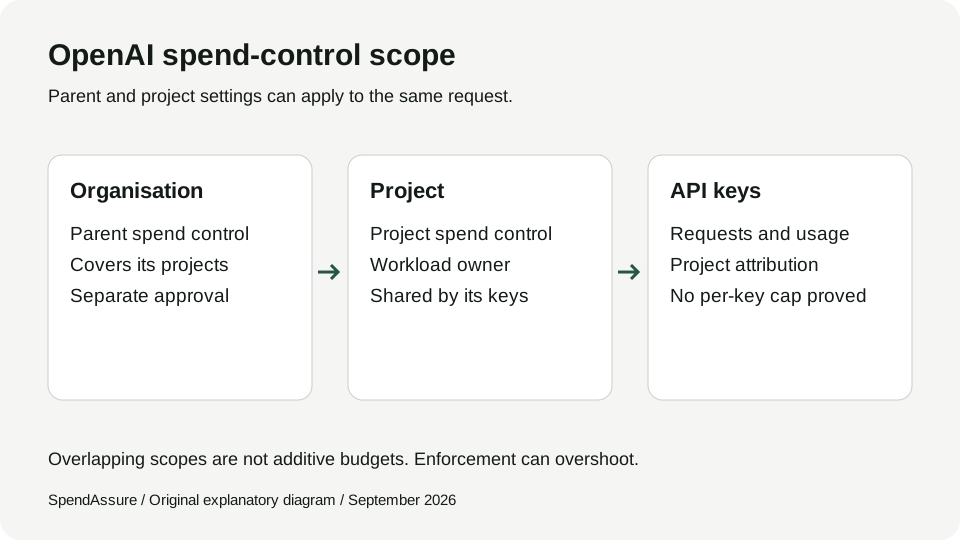
Check the actual setting in the relevant organisation or project. The documented UI includes an “Enforce a hard limit” option. The organisation control covers its projects; an individual project control has a narrower scope. A project setting cannot remove an organisation-level restriction. See the documented configuration steps.
For an internal review, record both the approved budget and the observed enforcement setting. A screenshot showing only an amount is incomplete evidence: the reviewer also needs the resource, period and enabled control.
Review note, 21 September 2026: the current source describes enforced monthly limits. We have not established an official introduction or restoration date, so this guide does not repeat historical dates from third-party posts.
| Record | Question to answer |
|---|---|
| Budget approval | Who approved this amount, for which resource and period? |
| Alert | Who receives it, and what are they expected to do? |
| Enforced limit | Is enforcement enabled, and which requests does it cover? |
| Review evidence | Who checked the configuration, and when? |
Can you limit spending for one OpenAI API key?
The reviewed OpenAI spend-limit guide establishes organisation and project controls, not a separate per-key spend cap. Per-key usage attribution is a different capability. Do not assume that a key with its own usage report has its own enforceable budget.
If one workload needs an independently managed budget, evaluate placing it in a dedicated project. Check which keys and applications still share that project, and include migration work in the decision. Moving a label in a spreadsheet does not move the underlying charges.
For a project containing several keys, record the relationship between the keys, workload owner and common control. The approval applies to the provider resource you can actually manage.
Can you manage OpenAI spend limits by API?
The Admin API documentation includes organisation and project spend-limit management. This is a separate administrative capability from making model requests. The API reference exposes retrieval, updates and deletion for a project spend limit. Source: Admin APIs; project reference.
API access creates a useful automation option, but not a budget-approval process by itself. Before connecting administrative credentials, agree which service can propose changes, which human can approve them and where the authority to execute them lives.
Keep a record of the before and after values, the approved reason and the resource identifier. Separating a requested change from its observed result helps when a request succeeds but the expected setting has not yet been confirmed.
What should you check when a limit is reached?
A 429 status alone does not identify the restriction. OpenAI’s spend guide names project_spend_limit_exceeded and organization_spend_limit_exceeded for the corresponding enforced controls. Inspect the response body before increasing a budget; repeated retries cannot repair a reached spend limit. Source: OpenAI enforcement behaviour.
Your response procedure should establish whether the usage was expected, which workload is affected and who can authorise further spending. An automatic increase made only to clear an error can bypass the financial decision the limit was meant to support.
For production workloads, agree the escalation route before the first incident. The person investigating traffic may not be the person authorised to increase the financial commitment. Record both responsibilities.
A project budget is not automatically a team budget
Consider a project shared by Product and Research. Finance approves €6,000 for Product and €4,000 for Research. Those allocations express two decisions, but one shared provider resource may still have one combined control. The example does not imply that the provider can enforce each internal allocation separately.
Map the provider resource to the owner who can act on it. If independent team controls are required, investigate whether separate projects and credentials fit the application and operational requirements. Keep the approval model consistent with the resource structure.
Also avoid summing an organisation limit and its project limits as if they covered unrelated spending. Report the hierarchy and scope so finance can see where amounts overlap.
Use this review checklist
These are review steps, not an account-tested implementation recipe. Confirm your permissions and current settings against the official documentation before changing production controls.
SpendAssure keeps a verifiable record of this across AI products: who owns each project, what it costs and which spending has a limit behind it. It is read-only and does not change limits at OpenAI. See how SpendAssure works and the full capability reference.
Use the spending-policy template to record the requester, approver and verified result of a change.
- Identify the organisation and project that receive the charges.
- Record the approved monthly amount, currency, owner and approver.
- Check the saved enforcement setting separately from alert thresholds.
- Review shared workloads and overlapping parent controls.
- Define who can increase the limit and who handles interrupted traffic.
- Record the verification date and next review; investigate unexpected changes.