SpendAssure
AI spend management for finance, IT and procurement
Transparent AI spending. Every figure traced to its source.
SpendAssure turns AI invoices, provider console exports and contracts into one verifiable view of your organisation's AI spending: who uses what, what it costs and what it will cost.
- Read-only access
- No prompts or model responses
- Starts from data you already have
What we do
One verifiable record of what your organisation spends on AI
AI reaches the budget through many routes at once: seat licences, usage-based APIs, cloud commitments and subscriptions on corporate cards. SpendAssure brings them into one record that finance, IT and procurement can all work from.
AI spend register
Every AI tool and service in one place, by team and project, with an owner for each item.
Savings
Licences paid for but not used, overlapping tools, and invoices that do not match contract terms. Each finding has an estimated amount and an owner, and the actual saving is checked on later invoices.
Forecast and budget
A forecast against the approved budget, in several scenarios, with exchange rates taken into account.
Contract renewals
A calendar with the last date to decide on each contract and the effect of any price change.
Input for reporting
Structured data on AI tools, vendors and contracts, ready for reports to the management board, the parent group and regulators.
Budget alertsOptional
Notifications when spending approaches a budget, set up on request. Alerts need read-only access to provider APIs.
In the workspace
Figures you can check, decisions you can act on
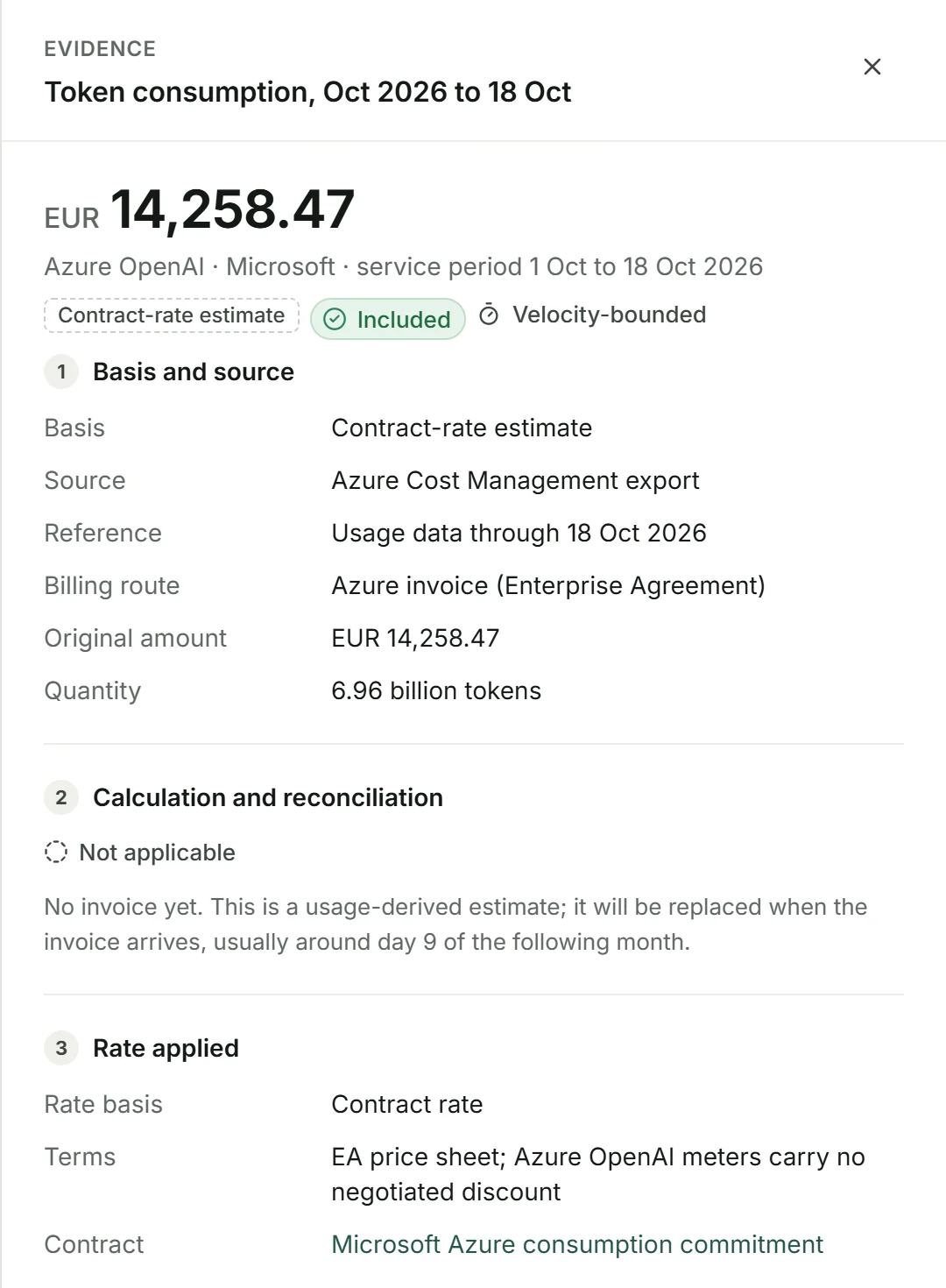
Every figure has a source
Open any amount to see the invoice line or export behind it, the rate applied, the exchange rate and how it was split between teams. The result holds up in front of the management board, auditors and the parent group.
- Invoice, export or contract behind each amount
- Estimates labelled until the invoice arrives
- Original currency and conversion rate kept
- Unallocated spend stays visible in the total
Savings with an amount and an owner
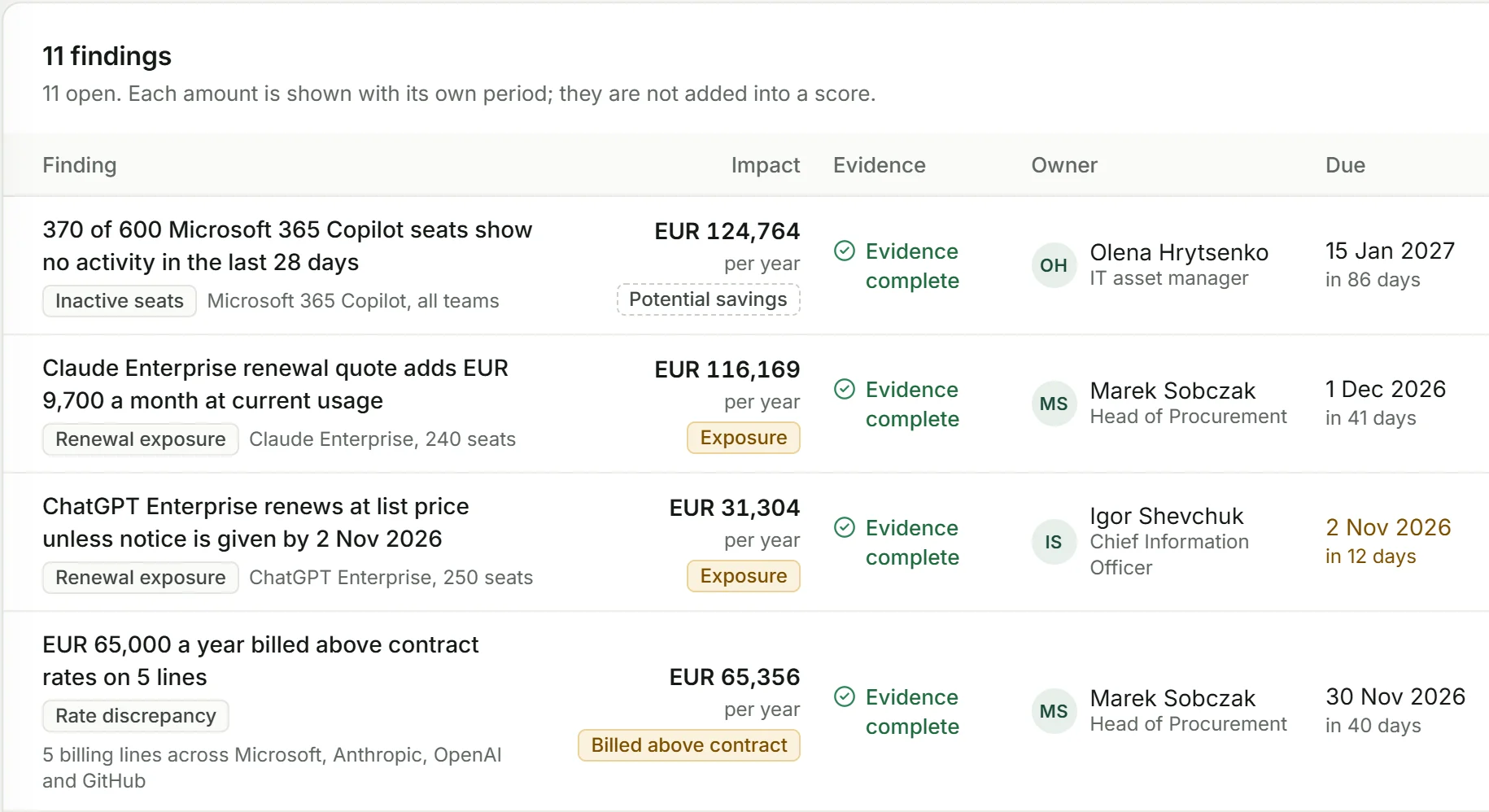
Findings cover seats nobody uses, tools that overlap and invoices billed above contract rates. Each states what was observed, what it is worth and on what assumption, who decides and by when. After a decision, the saving is checked on the following invoices.
- Each amount shown with its own period
- Evidence and its limits stated
- Verified savings reported apart from potential ones
Renewal decisions before the notice date
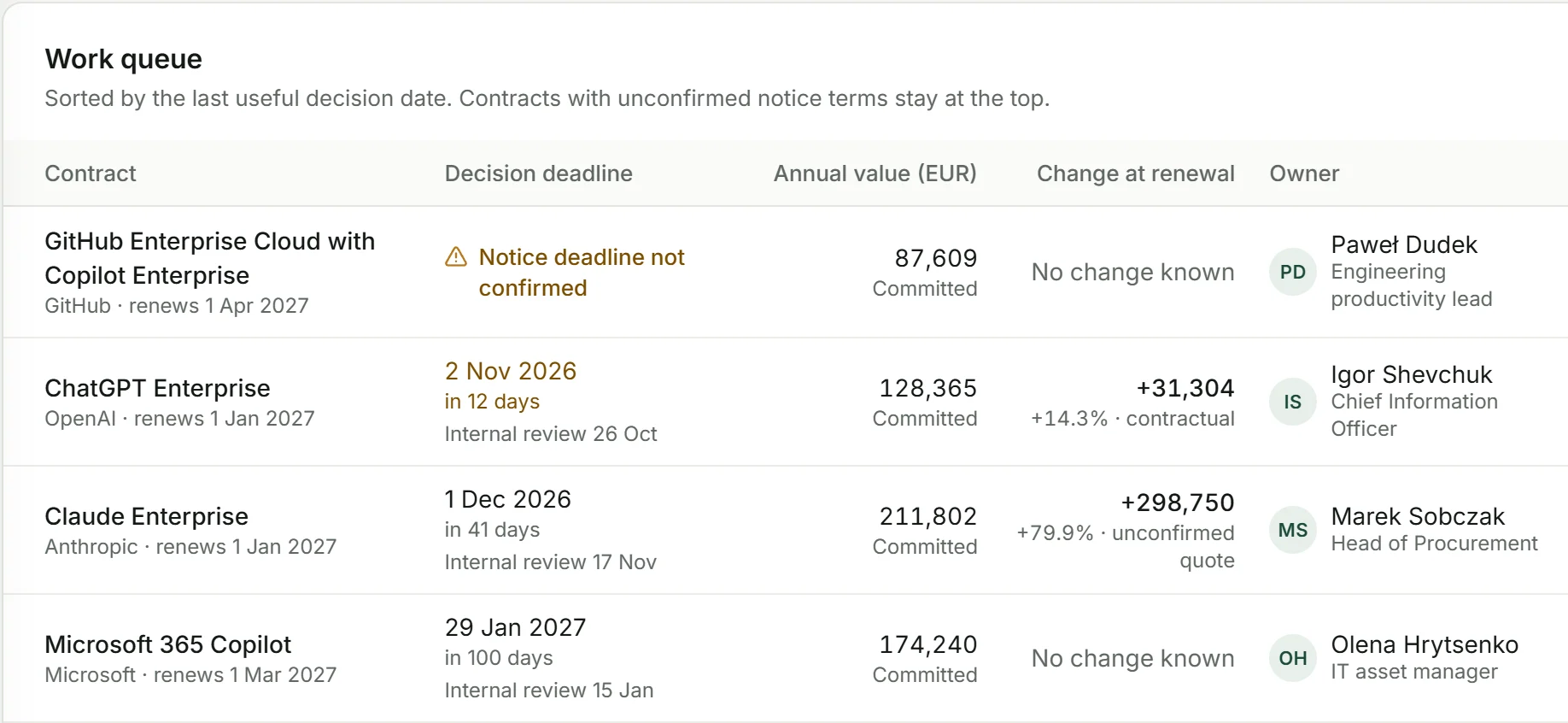
Contracts are ordered by the last date a decision is still useful, not by the renewal date. Each shows the annual value, the price change at renewal and the person responsible.
- Notice periods and renewal terms from the contract
- Unconfirmed vendor quotes labelled as such
- Scenarios that change no budget or provider setting
Forecast against the approved budget
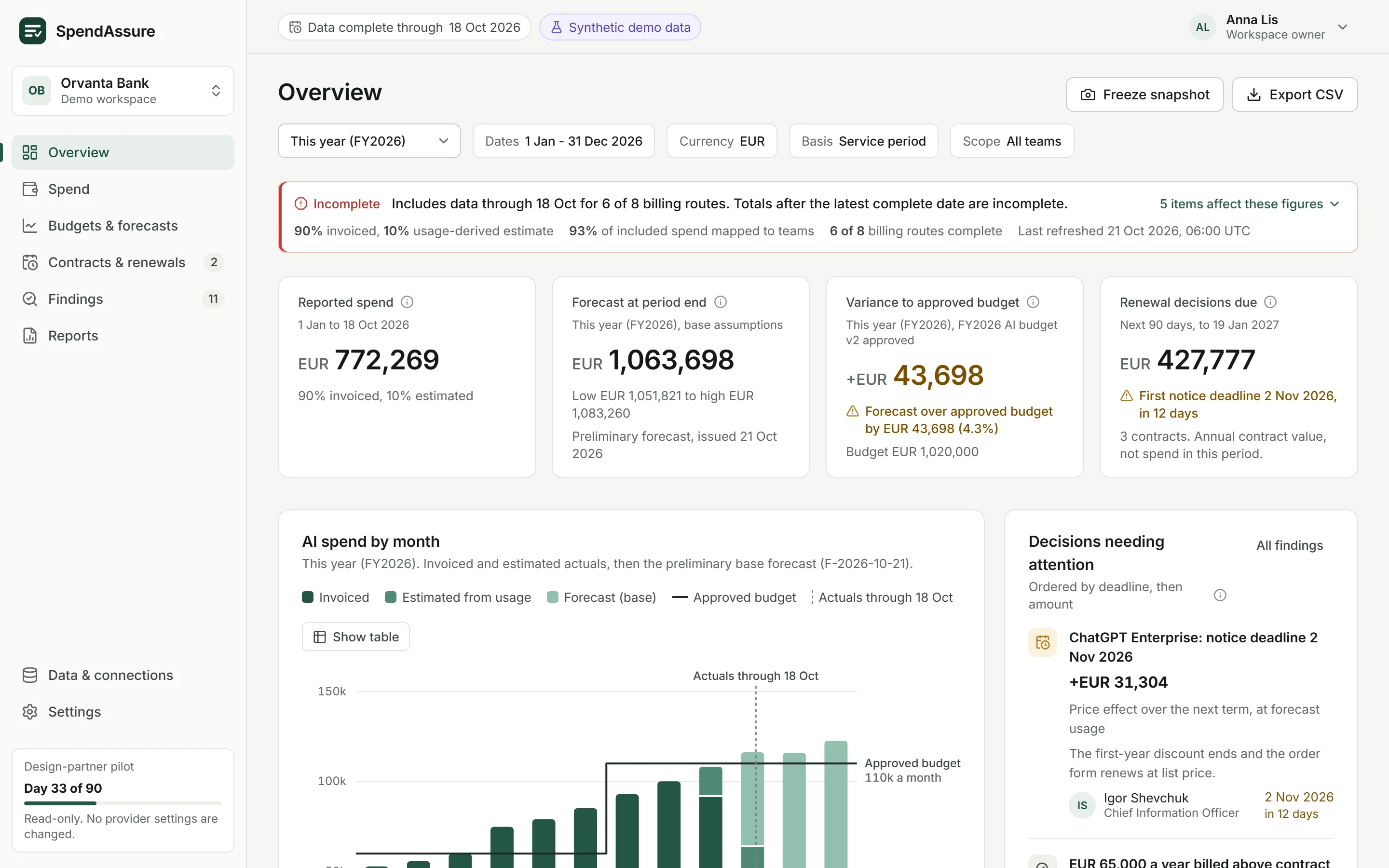
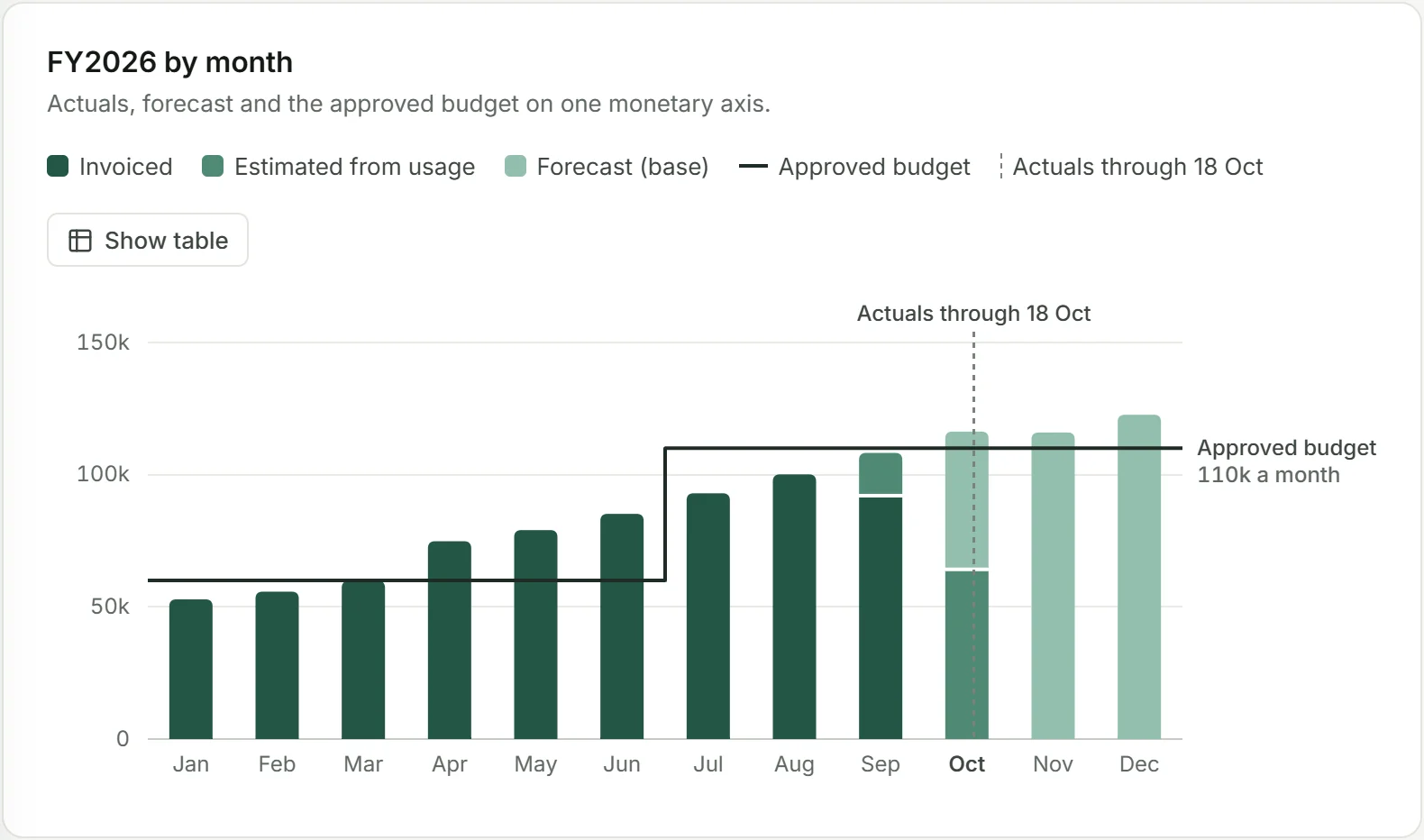
Actuals, forecast and budget on one axis, in your reporting currency. Low, base and high assumption sets show the range, and scenarios show the effect of a renewal, a seat reduction or a price change.
- Invoiced, estimated and forecast amounts kept apart
- Exchange rates stated next to converted amounts
- Forecast accuracy measured on your own history
How we work
From the data you already have to a forecast in 90 days
We start with invoices, provider console exports and contracts. No new integrations are needed to begin.
- Start
Data you already have
Invoices, exports from provider consoles and contracts. Read-only, with no changes to your systems.
- Pilot
First report after 10 days
Counted from when we receive the data. We agree the duration and success criteria with you.
- Day 10
- First report
- Day 45
- Full register
- Day 90
- Forecast
- Ongoing service
Kept up to date
After the pilot we maintain and update the register, the forecast and the renewal calendar.
Data security
Read-only, and no access to what people ask AI
Read-only access
We do not change your systems or the configuration of your accounts with AI providers.
No access to content
We do not process prompts or model responses, only usage, cost and billing data.
No external AI models
We analyse invoices and contracts without passing them to external AI providers.
Connector inside your infrastructure
When provider API access is needed, the connector runs in your environment, in read-only mode.
NDA and data processing agreement
We use your data only for our work together, under an NDA and a data processing agreement under the GDPR.
Why SpendAssure
Built for the questions finance has to answer
Figures you can check
Every amount shows the invoice or export it comes from and how it was calculated, so the result holds up with the management board, auditors and the parent group.
Independent of vendor and currency
Works with one AI provider or several, with amounts in different currencies converted at stated rates.
One view for finance, IT and procurement
Everyone works from the same data instead of reconciling separate spreadsheets.
Who we are
A product of e.Lens
SpendAssure is built by e.Lens sp. z o.o., a Polish technology company that makes software turning complex data into clear, verifiable figures. Its co-founders take part in client projects personally and oversee them.


Questions buyers ask
What is AI spend management?
AI spend management means keeping one complete record of what an organisation pays for AI, giving every cost an owner, comparing spending with budgets and contracts, and forecasting what comes next. Read the AI spend management guide.
What do you need from us to start?
Invoices, exports from your AI providers' admin consoles and the contracts you already hold. No new integrations are needed to begin. Read-only API access is needed only if you want budget alerts. See how a pilot works.
Does SpendAssure change anything in our systems?
No. Access is read-only. We do not change your systems or the configuration of your accounts with AI providers. Decisions such as removing seats or renegotiating a contract stay with your team.
Do you see our prompts or model responses?
No. We process usage, cost and billing data only. Invoices and contracts are analysed without being sent to external AI providers. Read about data security.
Which AI vendors can you cover?
SpendAssure starts from invoices, exports and contracts, so it is not tied to one provider. It works with one vendor or several, and with amounts in different currencies. The demo workspace, for example, covers Microsoft 365 Copilot, Azure OpenAI, ChatGPT Enterprise, Claude Enterprise, GitHub Copilot, Cursor and AI subscriptions paid on corporate cards.
Can SpendAssure guarantee a maximum AI bill?
No. It shows which spending is bounded by a contract, capped by a provider, limited only in how fast it can grow, or not limited at all, so you can see where a maximum exists and where it does not. Read about the four control classes.
We would be glad to show you a demo
We walk you through the workspace on sample data and discuss what a pilot with your own invoices, exports and contracts would look like.